Server Settings
Yattee Server has two layers of configuration:
- Environment variables -- set at startup in
docker-compose.ymlor a.envfile. These control low-level server behavior (bind address, port, data directories, CORS, cookie security). See the Docker Setup page for the full list. - Runtime settings -- managed through the admin panel Settings tab. These are stored in the database and can be changed at any time without restarting the server.
This page documents every runtime setting available in the admin panel.
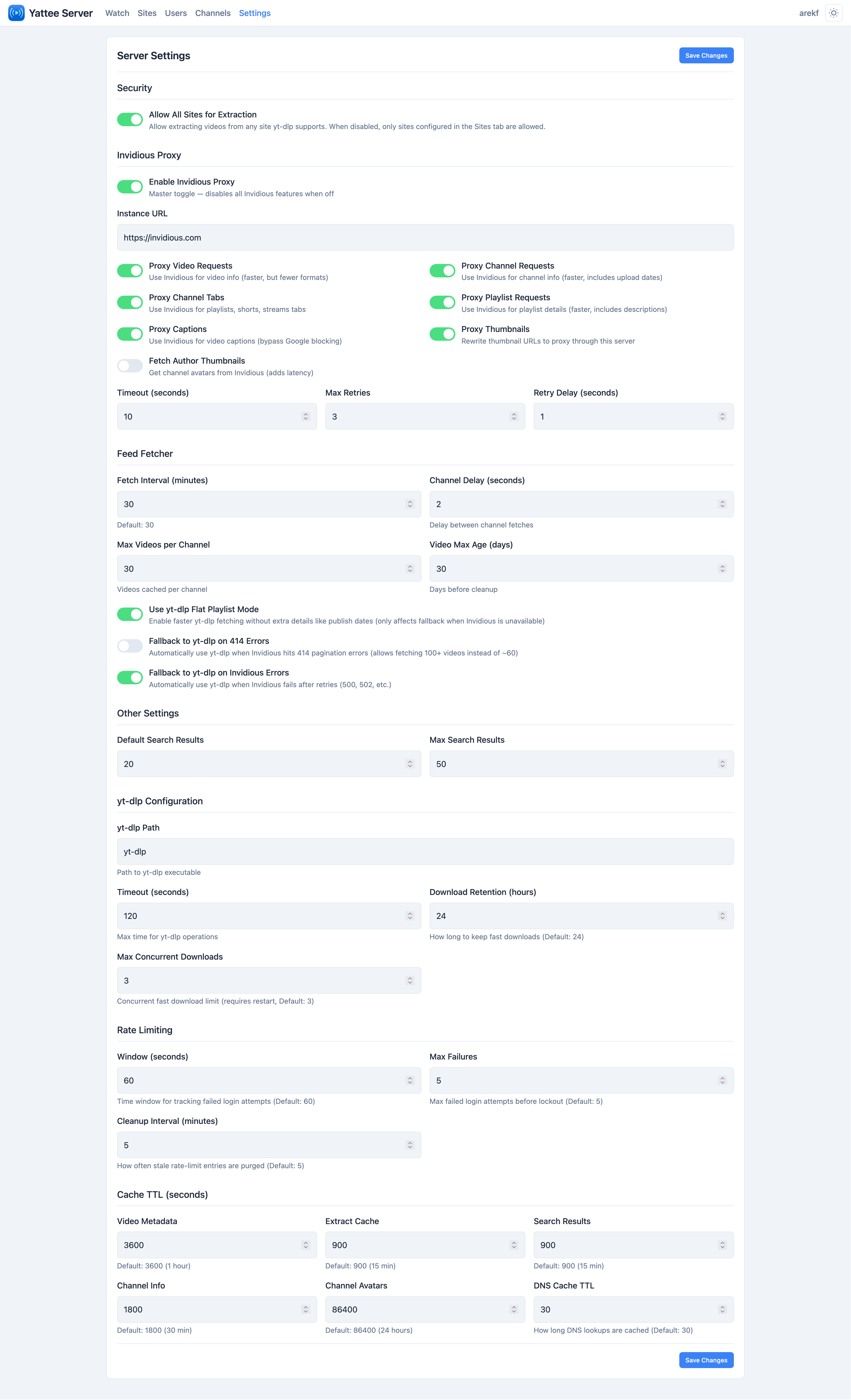
Changes to runtime settings take effect immediately. There is no need to restart the server or the Docker container.
yt-dlp
Settings that control how the server invokes yt-dlp for video extraction.
| Setting | Default | Range | Description |
|---|---|---|---|
ytdlp_path | yt-dlp | -- | Path to the yt-dlp binary. Only change this if yt-dlp is installed in a non-standard location. |
ytdlp_timeout | 120 | 10--600 | Maximum time in seconds to wait for a single yt-dlp extraction to complete. Increase this if you frequently see timeout errors on slow connections. |
Cache TTLs
Yattee Server caches various data to reduce redundant yt-dlp and Invidious calls. Each TTL (time-to-live) value is specified in seconds.
| Setting | Default | Range | Description |
|---|---|---|---|
cache_video_ttl | 3600 (1 hour) | 60--86400 | How long video metadata (title, description, thumbnails) is cached. |
cache_search_ttl | 900 (15 min) | 60--7200 | How long search results are cached. |
cache_channel_ttl | 1800 (30 min) | 60--86400 | How long channel information is cached. |
cache_avatar_ttl | 86400 (24 hours) | 3600--604800 | How long avatar images are cached. Avatars change rarely, so a long TTL is appropriate. |
cache_extract_ttl | 900 (15 min) | 60--7200 | How long extracted stream URLs are cached. Keep this short since CDN URLs often expire. |
Lower TTL values mean fresher data but more frequent yt-dlp and Invidious requests. If your server has limited bandwidth or you are hitting rate limits on upstream services, consider increasing these values. Conversely, if you need real-time accuracy (e.g., for live stream URLs), lower cache_extract_ttl.
Search
Controls for search result pagination.
| Setting | Default | Range | Description |
|---|---|---|---|
default_search_results | 20 | 5--50 | Number of results returned per search page when the client does not specify a count. |
max_search_results | 50 | 10--100 | Upper limit on results per page. Client requests exceeding this value are clamped. |
Invidious Proxy
Yattee Server can proxy requests through an Invidious instance to provide search, trending, channel browsing, captions, and thumbnails without relying solely on yt-dlp.
General
| Setting | Default | Range | Description |
|---|---|---|---|
invidious_enabled | true | -- | Master toggle for the Invidious proxy. When disabled, all Invidious-dependent features fall back to yt-dlp or become unavailable. |
invidious_instance | (empty) | -- | Full URL of the Invidious instance (e.g., https://invidious.example.com). |
invidious_timeout | 10 | 5--60 | Request timeout in seconds for each call to the Invidious API. |
invidious_max_retries | 3 | 1--10 | How many times to retry a failed Invidious request before giving up. |
invidious_retry_delay | 1.0 | 0.5--30.0 | Delay in seconds between retry attempts. |
invidious_author_thumbnails | false | -- | Include author (channel) thumbnails in Invidious API responses. Enable this if your client displays channel avatars alongside search results. |
Proxy Toggles
These toggles control which categories of data are fetched through Invidious rather than directly via yt-dlp. Disabling a category causes the server to skip Invidious for that data type.
| Setting | Default | Description |
|---|---|---|
invidious_proxy_channels | true | Proxy channel metadata through Invidious. |
invidious_proxy_channel_tabs | true | Proxy channel tab data (videos, playlists, shorts) through Invidious. |
invidious_proxy_videos | true | Proxy video metadata through Invidious. |
invidious_proxy_playlists | true | Proxy playlist data through Invidious. |
invidious_proxy_captions | true | Proxy caption/subtitle data through Invidious. |
invidious_proxy_thumbnails | true | Proxy thumbnail images through Invidious. |
Even with all proxy toggles enabled, Invidious is only used when invidious_enabled is true and a valid invidious_instance URL is configured.
Feed
The feed system periodically fetches new videos from channels that users have subscribed to. These settings control that background process.
| Setting | Default | Range | Description |
|---|---|---|---|
feed_fetch_interval | 1800 (30 min) | 300--86400 | How often the background feed fetch runs, in seconds. |
feed_channel_delay | 2 | 1--30 | Delay in seconds between fetching each channel during a feed update. This throttles requests to avoid rate limiting. |
feed_max_videos | 30 | 10--100 | Maximum number of videos to store per channel in the feed. |
feed_video_max_age | 30 | 1--365 | Maximum age of videos in days. Videos older than this are pruned from the feed. |
feed_ytdlp_use_flat_playlist | true | -- | Use yt-dlp flat playlist mode for faster channel fetching. Flat mode retrieves video IDs without full metadata extraction, which is significantly faster. |
feed_fallback_ytdlp_on_414 | false | -- | Fall back to yt-dlp when Invidious returns HTTP 414 (URI Too Long) errors. This can happen with channels that have very long metadata. |
feed_fallback_ytdlp_on_error | true | -- | Fall back to yt-dlp when Invidious returns any error. This provides resilience when your Invidious instance is down or rate-limited. |
If feed updates are slow, make sure feed_ytdlp_use_flat_playlist is enabled. This avoids full metadata extraction for each video during the channel scan, dramatically reducing fetch time.
Extraction
| Setting | Default | Description |
|---|---|---|
allow_all_sites_for_extraction | false | When enabled, the server accepts extraction requests for any URL that yt-dlp supports, regardless of whether a matching site is configured. When disabled (the default), only URLs matching a configured and enabled site in the Sites panel are accepted. |
Enabling allow_all_sites_for_extraction means any authenticated user can request the server to extract content from any of the 1000+ sites yt-dlp supports. Only enable this if you trust all users on your server and understand the resource implications.
Security
| Setting | Default | Range | Description |
|---|---|---|---|
dns_cache_ttl | 30 | 5--3600 | How long DNS resolution results are cached in seconds. The server caches DNS lookups to reduce latency on repeated requests to the same hosts. |
Rate Limiting
These settings protect the server from brute-force authentication attempts.
| Setting | Default | Range | Description |
|---|---|---|---|
rate_limit_window | 60 | 10--600 | Time window in seconds over which failed authentication attempts are counted. |
rate_limit_max_failures | 5 | 1--100 | Maximum number of failed authentication attempts allowed within the window before the source is temporarily blocked. |
rate_limit_cleanup_interval | 300 | 60--3600 | How often the rate limiter purges expired entries, in seconds. |
Proxy Downloads
When proxy streaming is enabled for a site, video streams pass through the server. These settings control that proxy behavior.
| Setting | Default | Range | Description |
|---|---|---|---|
proxy_download_max_age | 86400 (24 hours) | 60--604800 | Maximum age in seconds for cached proxy download files. Files older than this are cleaned up. |
proxy_max_concurrent_downloads | 3 | 1--20 | Maximum number of simultaneous proxy download streams the server will handle. Increase this if you have multiple users streaming concurrently, but be mindful of bandwidth and disk usage. |
Proxy download files are stored in the DOWNLOAD_DIR volume (/downloads in Docker). Make sure this volume has sufficient disk space for your expected concurrent streaming load.