User Management
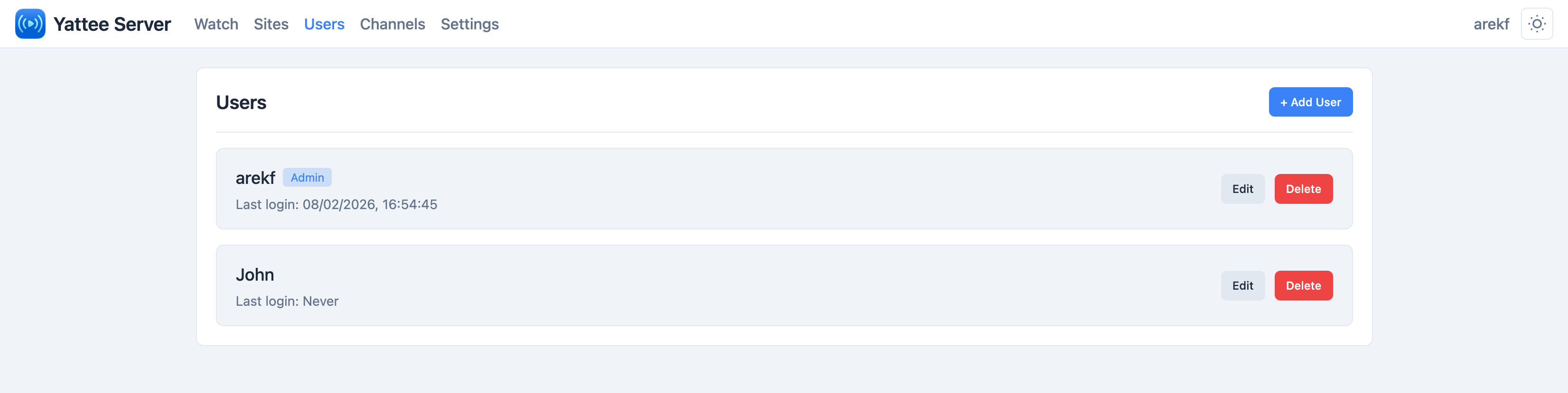
Yattee Server requires authentication for all API access. Users are managed through the Users tab in the admin panel.
Roles
There are two roles:
| Role | API Access | Admin Panel |
|---|---|---|
| Admin | Full access to all API endpoints | Full access -- can manage users, sites, credentials, and settings |
| Regular User | Can use video, search, channel, feed, and playlist endpoints | No access to admin endpoints or the admin panel |
The first admin account is created during the Setup Wizard or via auto-provisioning environment variables. Additional users are created through the admin panel.
Authentication
Yattee Server uses HTTP Basic Authentication. Clients send the username and password with every API request as a standard Authorization: Basic <base64> header.
There are no sessions or tokens for API access. The Yattee iOS/macOS/tvOS client handles this automatically -- you just enter the server URL, username, and password in the app settings.
Creating a User
- Open the admin panel and navigate to the Users tab.
- Click Add User.
- Enter a username and password.
- Optionally toggle Admin to grant admin privileges.
- Click Save.
Constraints
- Username: 3 to 50 characters.
- Password: minimum 6 characters.
- Passwords are hashed with bcrypt before being stored in the database. Plain-text passwords are never persisted.
Managing Existing Users
Changing a Password
Select a user and update their password. The new password must meet the minimum 6-character requirement. The change takes effect immediately -- the user will need to use the new password on their next API request.
Granting or Revoking Admin Privileges
Toggle the Admin flag on any user to promote or demote them.
Deleting a User
Click the delete action on the user you want to remove. The user will immediately lose access to all API endpoints.
Best Practices
- Create individual accounts for each person or device that needs access, rather than sharing a single set of credentials. This makes it easier to revoke access later if needed.
- Use strong passwords. While the minimum is 6 characters, longer passwords with a mix of letters, numbers, and symbols are recommended, especially if your server is exposed to the internet.
- Limit admin accounts. Most users only need regular access. Reserve admin privileges for people who need to manage server configuration.
- Put the server behind HTTPS. Because HTTP Basic Auth sends credentials with every request, always use a reverse proxy with TLS termination when exposing Yattee Server to the internet.