Site Configuration
Yattee Server uses yt-dlp as its extraction engine, which supports over 1000 websites. The Sites tab in the admin panel controls which of these sites are enabled on your server and how they behave.
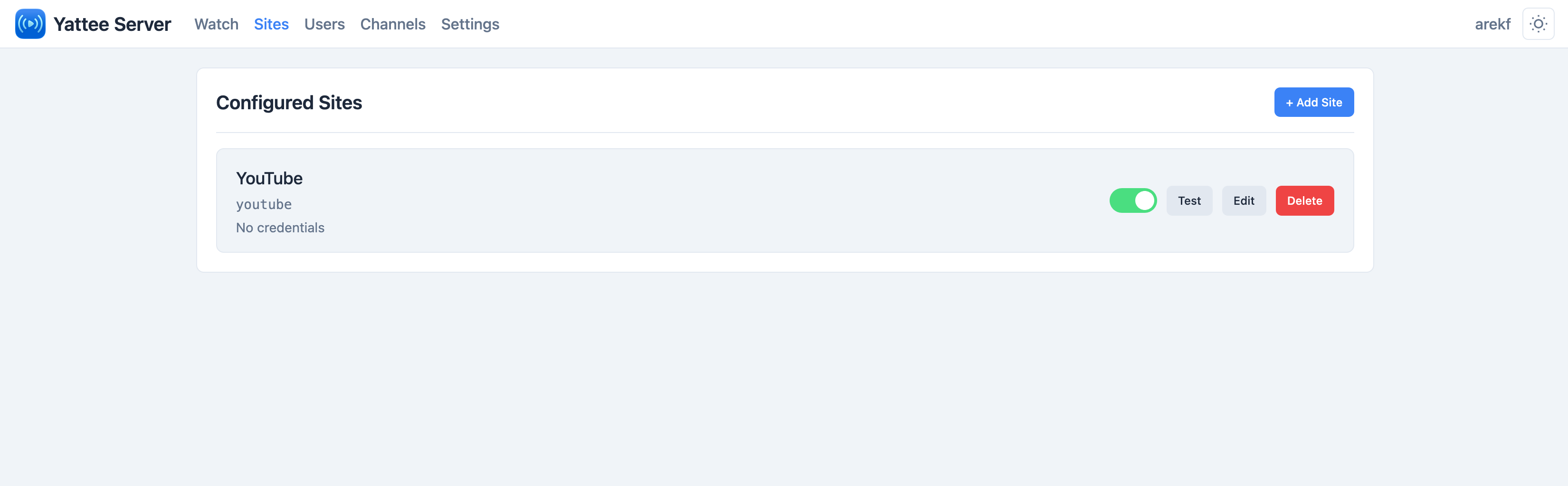
How Sites Work
When a client sends a URL to the server for extraction, the server checks it against the list of configured sites. If a matching, enabled site is found, the extraction proceeds. If no match is found and allow_all_sites_for_extraction is disabled (the default), the request is rejected.
This gives you fine-grained control over what content your server processes.
Default Configuration
A fresh Yattee Server installation comes with YouTube pre-configured:
| Field | Value |
|---|---|
| Name | YouTube |
| Extractor Pattern | youtube |
| Enabled | Yes |
| Priority | 100 |
| Proxy Streaming | No |
Site Fields
Each site entry has the following fields:
| Field | Description |
|---|---|
| Name | A human-readable label for the site (e.g., "YouTube", "TikTok"). This is for display purposes only. |
| Extractor Pattern | A pattern matched against yt-dlp extractor names to determine if this site configuration applies to a given URL. See Extractor Pattern Matching below. |
| Enabled | Whether this site is active. Disabled sites are ignored during URL matching. |
| Priority | A numeric value that determines the order in which sites are checked for credential matching. Higher priority sites are checked first. |
| Proxy Streaming | Whether video streams for this site should be proxied through the server. See Proxy Streaming below. |
Extractor Pattern Matching
The extractor pattern is matched against the extractor name that yt-dlp assigns to a URL. Patterns support wildcards:
| Pattern | Matches |
|---|---|
youtube | Exact match -- only the extractor named "youtube" |
*twitter* | Contains -- any extractor with "twitter" in its name |
twitter* | Starts with -- extractors starting with "twitter" |
*twitter | Ends with -- extractors ending with "twitter" |
If you are unsure what extractor name yt-dlp uses for a site, you can run yt-dlp --list-extractors to see the full list. Extractor names are case-sensitive.
Adding a Site
From the Popular Sites List
The admin panel includes a dropdown of popular pre-configured sites that you can add with a single click. Each entry comes with a suggested extractor pattern, recommended proxy streaming setting, and credential type hints.
Available pre-configured sites include:
- YouTube --
youtube - TikTok --
*tiktok* - Twitter / X --
*twitter* - Instagram --
*instagram* - Facebook --
*facebook* - Twitch --
*twitch* - Vimeo --
*vimeo* - Dailymotion --
*dailymotion* - Reddit --
*reddit* - SoundCloud --
*soundcloud*
Each popular site entry also includes an example URL you can use to test extraction after setup.
Manually
- Click Add Site.
- Enter a Name and Extractor Pattern.
- Set the Priority (higher values are matched first).
- Toggle Proxy Streaming if needed.
- Click Save.
Proxy Streaming
The Proxy Streaming flag is the per-site default that decides whether yattee-server returns direct CDN URLs to the client or routes streams through the server. When on, playback fetches return signed /proxy/relay URLs (byte-relay with HTTP Range support); when off, the client gets direct CDN URLs.
Use it when:
- The site IP-binds stream URLs (most prominently YouTube/googlevideo) and your clients reach the server from a different network than the server uses for extraction.
- The site requires cookies or auth headers the client doesn't have.
- You want to keep client IP addresses private from content providers.
Leave it off when all your clients are on the same network as the server and direct streams are reachable -- direct is the most bandwidth-efficient path.
The flag is the operator-level default. The iOS/macOS client also has a per-source toggle that can override it. For the full picture (modes, the /proxy/relay vs /proxy/fast/ split, how the client and server toggles interact, capacity tuning), see Stream Proxying.
When proxying is on, all video bytes traverse the server. See Server Settings -> Proxy Downloads for the related capacity caps.
Testing a Site
After configuring a site (and optionally adding credentials for it), use the Test button to verify that extraction works. The test performs a real yt-dlp extraction against a sample URL for that site, confirming that:
- The extractor pattern matches correctly
- Any configured credentials are accepted
- The site returns valid stream data
Testing uses an actual yt-dlp extraction, so it may take a few seconds depending on the site and your server's connection speed.
Extraction Scope
By default, only URLs matching a configured and enabled site are accepted for extraction. This is controlled by the allow_all_sites_for_extraction setting:
| Setting Value | Behavior |
|---|---|
false (default) | Only URLs matching an enabled site entry are processed. All other URLs are rejected. |
true | Any URL that yt-dlp recognizes is processed, regardless of whether a site entry exists. Site entries are still used for credential matching and proxy streaming decisions. |
You can change this setting in the Server Settings page.
When allow_all_sites_for_extraction is disabled, make sure all sites you want to use are both configured and enabled. A configured but disabled site will still reject URLs.
Credentials
Sites that require authentication (age-restricted content, premium videos, private content) need credentials configured separately. Credentials are linked to sites by extractor pattern and priority.
For full details on setting up cookies, usernames/passwords, and OAuth tokens for your sites, see the Credentials & Security page.
Next Steps
- Credentials & Security -- Configure authentication for sites that require login
- Server Settings -- Adjust cache TTLs, extraction scope, and proxy download limits